复盘导读:在处理 Kaggle 链家网 30 万条北京二手房数据集时,我最初试图用一个简单的字典映射来批量转换 26 个字段的数据类型。然而,一个刺眼的报错 cannot safely cast non-equivalent float64 to int8 彻底打乱了计划。本文复盘了我是如何放弃低效的“人工查阅 CSV”,转而用 Python 构建“自动化异常扫描仪”,并实现数据类型的智能向下转型(Downcast)的全过程。
出师不利:CSV 读取时的“混合类型”陷阱
刚用 pd.read_csv 载入数据,还没来得及高兴,控制台就飘来一行橙色警告:
1
2
3
4
| import pandas as pd
import numpy as np
df = pd.read_csv('new.csv', encoding='gbk')
|
C:...: DtypeWarning: Columns (1,11,12,14) have mixed types.
Specify dtype option on import or set low_memory=False.
这个警告意味着什么?
Pandas 在读取大文件时默认开启 low_memory=True(分块读取并逐块推断类型)。当某一列在不同块中被推断为不同类型(例如前 10 万行是整数,后 10 万行混入了字符串 “未知” 或小数),Pandas 就会抛出 DtypeWarning
灾难现场:批量转型的“滑铁卢”
面对 26 个非标准化的业务字段,为了避免重复劳动,我起初写了一个 SCHEMA_MAP 字典,试图通过循环进行批量的类型固化:
例如将离散型的特征(卧室数、是否有电梯、地铁等)强转为 Int8 以节省内存。
1
2
3
4
5
6
7
8
9
10
11
12
13
14
15
16
17
18
19
20
21
22
23
24
25
26
| import pandas as pd
import numpy as np
df = pd.read_csv('new.csv', encoding='gbk', dtype=str, keep_default_na=False)
SCHEMA_MAP = {
'string': ['url', 'id', 'Cid'],
'float': ['Lng', 'Lat', 'totalPrice', 'price', 'square', 'ladderRatio', 'communityAverage'],
'Int64': ['DOM', 'followers'],
'Int16': ['constructionTime'],
'Int8': ['livingRoom', 'drawingRoom', 'kitchen', 'bathRoom',
'buildingType', 'renovationCondition', 'buildingStructure',
'elevator', 'fiveYearsProperty', 'subway', 'district']
}
for dtype, cols in SCHEMA_MAP.items():
for col in cols:
if dtype == 'string':
df[col] = df[col].astype(str)
elif dtype == 'float':
df[col] = pd.to_numeric(df[col], errors='coerce')
else:
df[col] = pd.to_numeric(df[col], errors='coerce').astype(dtype)
df['tradeTime'] = pd.to_datetime(df['tradeTime'], errors='coerce')
floor_split = df['floor'].str.extract(r'([中高低底])(\d+)')
df['floor_type'] = floor_split[0]
df['total_floors'] = pd.to_numeric(floor_split[1], errors='coerce').astype('Int16')
df.drop('floor', axis=1, inplace=True)
|
但在执行 astype('Int8') 时,Pandas 抛出了致命错误:
cannot safely cast non-equivalent float64 to int8
这个报错意味着什么?
它表示数据中存在无法安全放入 -128 到 127 整数区间的值。原因无外乎三种:
- 存在空值(NaN)。
- 整数型字段混入了小数(如 2.5 个房间)。
- 数值型字段混入了文本乱码。
如果是几十行数据,打开 Excel 肉眼看一眼就行。但在三十万行、几十个字段的海量数据面前,人工排查无异于大海捞针。
破局:构建“全字段异常扫描仪”
既然不能人工看,那就让机器自己去“嗅探”。我利用 Pandas 的布尔索引与向量化运算,手写了一个自动化探针脚本,专门捕捉数值字段中的文本和小数。
核心代码实现:
1
2
3
4
5
6
7
8
9
10
11
12
13
14
15
16
17
18
19
20
21
22
23
24
25
26
27
28
| print("--- 🚨 全字段异常扫描仪启动 🚨 ---\n")
for col in df.columns:
temp_num = pd.to_numeric(df[col], errors='coerce')
is_text_mask = df[col].notna() & (df[col] != '') & temp_num.isna()
has_text = is_text_mask.any()
has_decimal = (temp_num.dropna() % 1 != 0).any()
if has_text or has_decimal:
print(f"⚠️ 发现异常字段: 【{col}】")
if has_text:
bad_texts = df.loc[is_text_mask, col].unique()[:3]
print(f" => 混入了文本或乱码: {bad_texts} ...")
if has_decimal:
decimals = temp_num[temp_num % 1 != 0].dropna().unique()[:3]
print(f" => 混入了带小数的数字: {decimals} ...")
print("-" * 40)
解释:首先,我们通过检查这个记事本,看出来这个文件是 ANSI 编码(中文 Windows 默认 GBK),所以用 gbk 才能正确读取中文,避免乱码。
dtype=str让整个字段全都变成字符串,一律按照文本对待,keep_default_na=False保留那些空值/nan值,保留原样。
to_numeric(df[col],errors=’coerce’)让整列转为数字,我们主要的问题是将那些错误字段正确转换为 Int8 类型。所以如果像url这种纯文本应该不出所料全是nan值,但是无妨,我们的研究对象不是这种纯文本字段,我们研究的是那些数值型字段里面掺杂着文本的字段。
notna()的目的是检查哪些原始数据不是缺失值,True 表示该位置的数据不是缺失值(即不是 NaN、None 或 NaT 等)。False 表示该位置的数据是缺失值。!=’’不是空值,isna()检查那些不能被转换为数值的nan值,最后找出那些”一开始不是nan值,不是空值,最后也不能转换为数值”的数据,也就是文本。
同理,dropna()去掉那些nan值,也就是不是数值的数据,%1 !=0检查是否为小数,2.0 % 1==0.0,2.5 % 1==0.5,最后找出那些整数型数值字段里掺杂着小数的”脏数据”,最后打印出来,检查是哪个字段出现了问题。
|
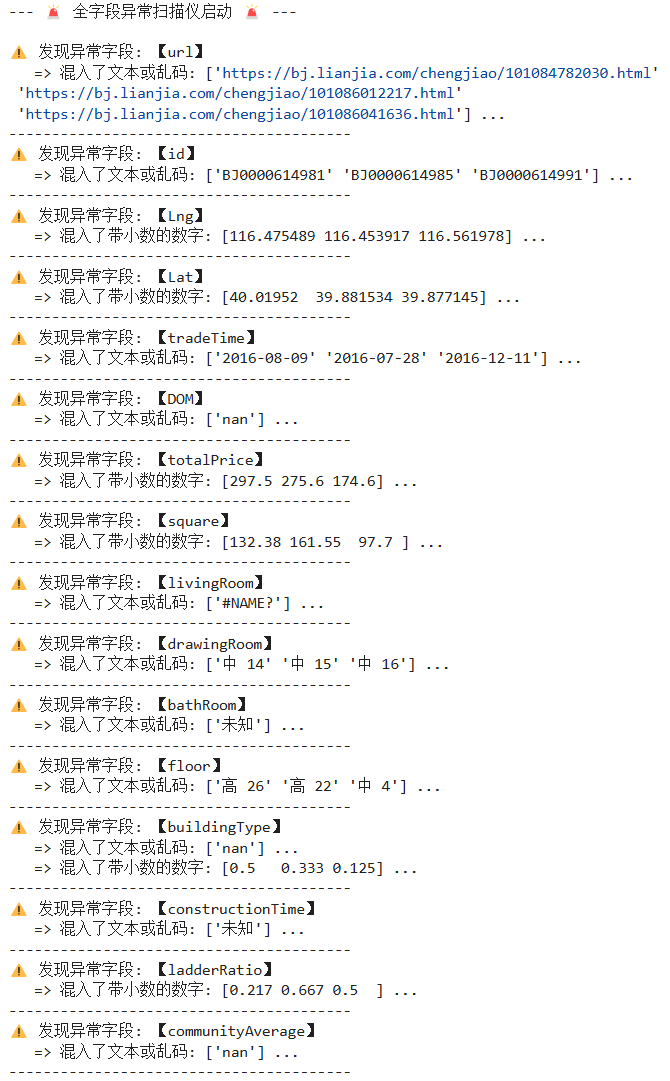
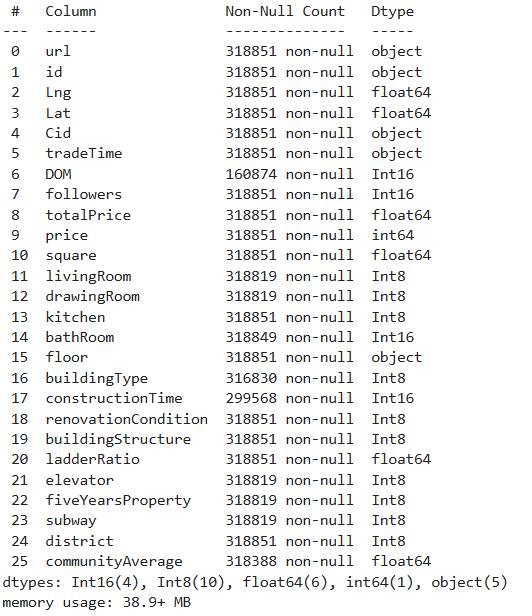
最后再次评判每个字段的数据类型,发现仍有错误,‘cannot safely cast non-equivalent float64 to int8’这个问题仍在,那么就只剩一个问题点了,因为是自主评判int系列的,那就是某字段里不符合评判标准,那就用np.iinfo来计算每个int系列的大小区域,最后计算每个数值型字段的最大最小值来进行int分组。
1
2
3
4
5
6
7
8
9
10
11
12
13
14
15
16
17
18
19
20
21
22
23
24
25
26
27
28
29
30
31
32
33
34
35
36
| df = pd.read_csv('new.csv', encoding='gbk', dtype=str, keep_default_na=False)
SCHEMA_MAP = {
'string': ['url', 'id', 'Cid'],
'float': ['Lng', 'Lat', 'totalPrice', 'price', 'square', 'ladderRatio', 'communityAverage']
}
auto_int_cols = ['DOM', 'followers', 'buildingType', 'renovationCondition', 'buildingStructure',
'district', 'constructionTime', 'livingRoom', 'drawingRoom', 'kitchen',
'bathRoom', 'elevator', 'fiveYearsProperty', 'subway']
for dtype, cols in SCHEMA_MAP.items():
for col in cols:
if dtype == 'string':
df[col] = df[col].astype(str)
elif dtype == 'float':
df[col] = pd.to_numeric(df[col], errors='coerce')
for col in auto_int_cols:
temp_series = pd.to_numeric(df[col], errors='coerce').round()
c_min = temp_series.min()
c_max = temp_series.max()
if pd.isna(c_min) or pd.isna(c_max):
df[col] = temp_series.astype('Int8')
final_type = 'Int8'
elif c_min >= np.iinfo(np.int8).min and c_max <= np.iinfo(np.int8).max:
df[col] = temp_series.astype('Int8')
final_type = 'Int8'
elif c_min >= np.iinfo(np.int16).min and c_max <= np.iinfo(np.int16).max:
df[col] = temp_series.astype('Int16')
final_type = 'Int16'
elif c_min >= np.iinfo(np.int32).min and c_max <= np.iinfo(np.int32).max:
df[col] = temp_series.astype('Int32')
final_type = 'Int32'
else:
df[col] = temp_series.astype('Int64')
final_type = 'Int64'
print(f"字段: 【{col:20}】 | Min: {str(c_min):<6} | Max: {str(c_max):<10} => 智能分配: {final_type}")
|
除此之外,还有两个字段没有录入成功,那就是“tradeTime”和“floor”,tradeTime直接df[‘tradeTime’] = pd.to_datetime(df[‘tradeTime’], errors=’coerce’)让其变成datetime类型,floor可能会出现未知等脏数据,所以我们用
floor_counts = df[‘floor’].value_counts()
print(floor_counts.head(30))
检查一下floor这个字段排行前30的数据总量,发现分为五种”顶、高、中、低、底”,而且检查这个head()发现每组中间用空格,那么用正则表达式就可以简单筛选一下,把floor分成floor_type、total_floors两部分。
floor_split = df[‘floor’].str.extract(r’([中高低底顶])\s*(\d+)’)
df[‘floor_type’] = floor_split[0]
df[‘total_floors’] = pd.to_numeric(floor_split[1], errors=’coerce’).astype(‘Int16’)
df.drop(‘floor’, axis=1, inplace=True)
最后发现新产生的这两个字段有1000数据的缺失,对数据占比不大,暂且忽略不计
完成数据录入